27
How to Find Your IP Address on Android (Step-by-Step Guide)
Learn how to find your IP address on Android, including both private and public IP addresses. Follow simple step-by-step instructions and discover the fastest way to check your current public IP.
Introduction
Knowing your IP address on Android can be useful for troubleshooting internet issues, configuring network devices, testing VPN connections, or setting up smart home equipment. Android devices have both a private IP address for local network communication and a public IP address used to connect to the internet.
This guide explains how to find both on any Android phone or tablet.
If you simply want to know your public IP address, you can check it instantly using our free What Is My IP Address tool:
https://mwp6.com/tool/whats-my-ip
Public IP vs Private IP
Android devices use two different IP addresses.
A private IP address is assigned by your Wi-Fi router and is only used inside your local network.
A public IP address is assigned by your Internet Service Provider (ISP) and identifies your internet connection.
The Android settings usually display your private IP, while an online IP lookup tool shows your public IP.
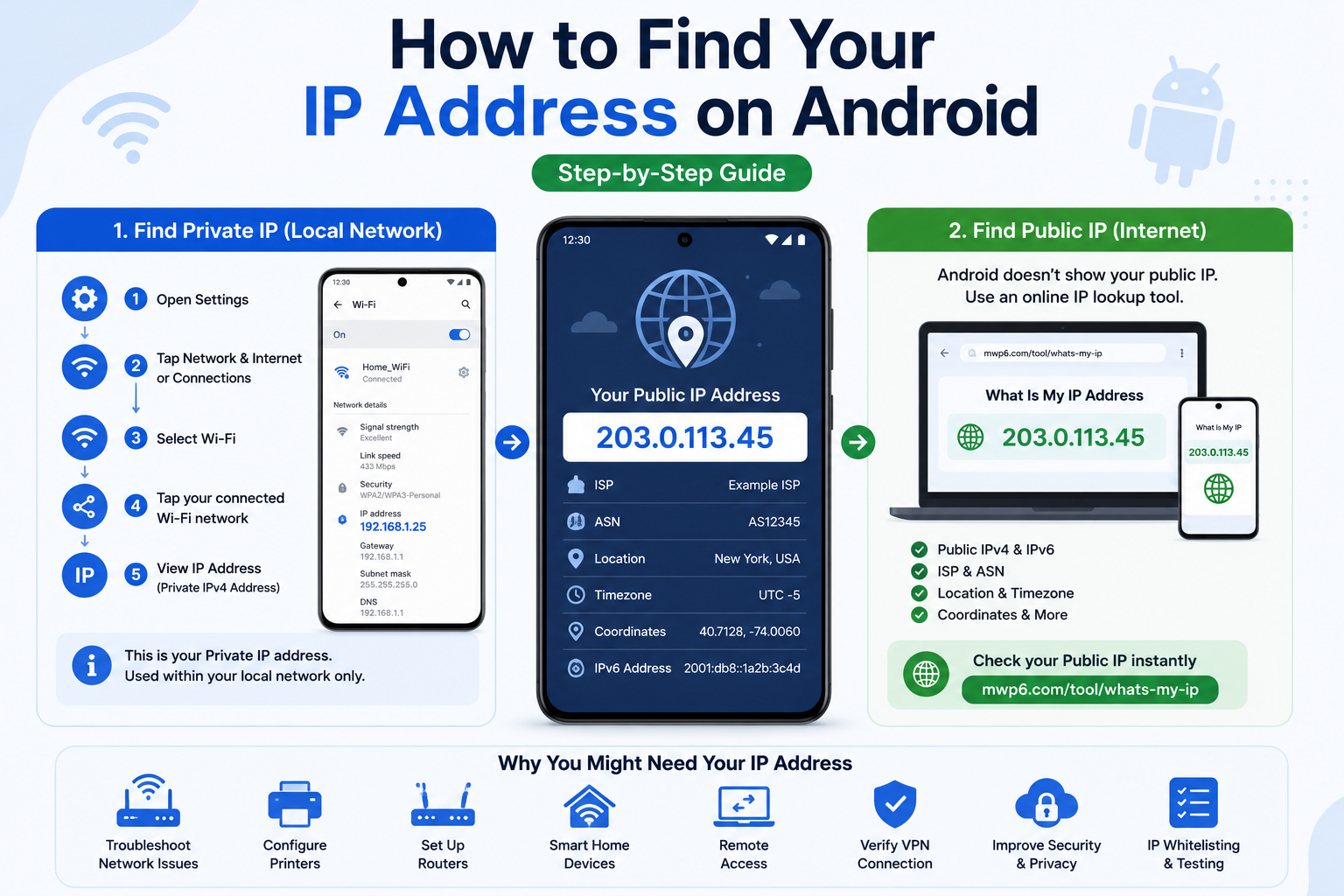
Method 1: Find Your IP Address from Wi-Fi Settings
Most Android phones allow you to view your private IP address directly.
- Open Settings.
- Tap Network & Internet or Connections.
- Select Wi-Fi.
- Tap the connected Wi-Fi network.
- Scroll to IP Address or Network Details.
You'll see your device's private IPv4 address.
The exact menu names may vary depending on the phone manufacturer.
Method 2: View Advanced Network Information
Some Android devices include additional networking details.
Depending on your device, you may also see:
- Gateway
- DNS server
- MAC address
- IPv6 address
- Network speed
These settings are useful when troubleshooting network problems.
Method 3: Find Your Public IP Address
Android does not display your public IP address in its settings.
The easiest method is to use an online IP lookup tool.
Our free What Is My IP Address tool instantly displays:
- Public IPv4 address
- IPv6 address (if available)
- ISP
- ASN
- Approximate location
- Timezone
- Geographic coordinates
- Additional network information
Check your public IP here:
https://mwp6.com/tool/whats-my-ip
Why Might You Need Your IP Address?
Knowing your Android IP address can help you:
- Troubleshoot Wi-Fi problems
- Configure routers
- Set up network printers
- Verify VPN connections
- Configure smart home devices
- Test remote access
- Whitelist your IP for online services
- Diagnose connectivity issues
Why Does My IP Address Change?
Your public IP address may change when:
- You reconnect your router.
- You switch between Wi-Fi and mobile data.
- Your ISP assigns a new dynamic IP.
- You connect through a VPN.
Your private IP address may also change whenever your router assigns a new address using DHCP.
Frequently Asked Questions
Does Android show my public IP?
No.
Android settings normally display only your private IP address.
To view your public IP, use an online IP lookup tool.
Why do I have different IP addresses on Wi-Fi and mobile data?
Because they are different networks.
Your Wi-Fi network and your mobile carrier each assign their own public IP address.
Can I change my IP address on Android?
Yes.
You can often change your public IP by switching networks, using mobile data, reconnecting your router, or using a VPN.
Can two Android phones have the same IP address?
Not on the same Wi-Fi network.
Each device connected to the same local network receives its own private IP address.
Is my IP address the same everywhere?
No.
Your public IP changes depending on the network you're connected to.
Conclusion
Finding your IP address on Android is simple once you know where to look. Your phone's settings can display your private IP address, while an online IP lookup tool is the fastest way to view your public IP and additional network information.
If you'd like to instantly check your public IP address, ISP, ASN, location, and other network details, use our free tool:
👉 https://mwp6.com/tool/whats-my-ip
Contact
Missing something?
Feel free to request missing tools or give some feedback using our contact form.
Contact Us