28
What Is DNS? A Beginner's Guide to the Domain Name System
Learn what DNS is, how the Domain Name System works, why it's essential for the internet, and how it translates domain names into IP addresses.
Introduction
Every time you visit a website, send an email, or use an online app, a technology called DNS works behind the scenes to help your device find the correct destination. Without DNS, you would need to remember long strings of numbers instead of simple website names like google.com or mwp6.com.
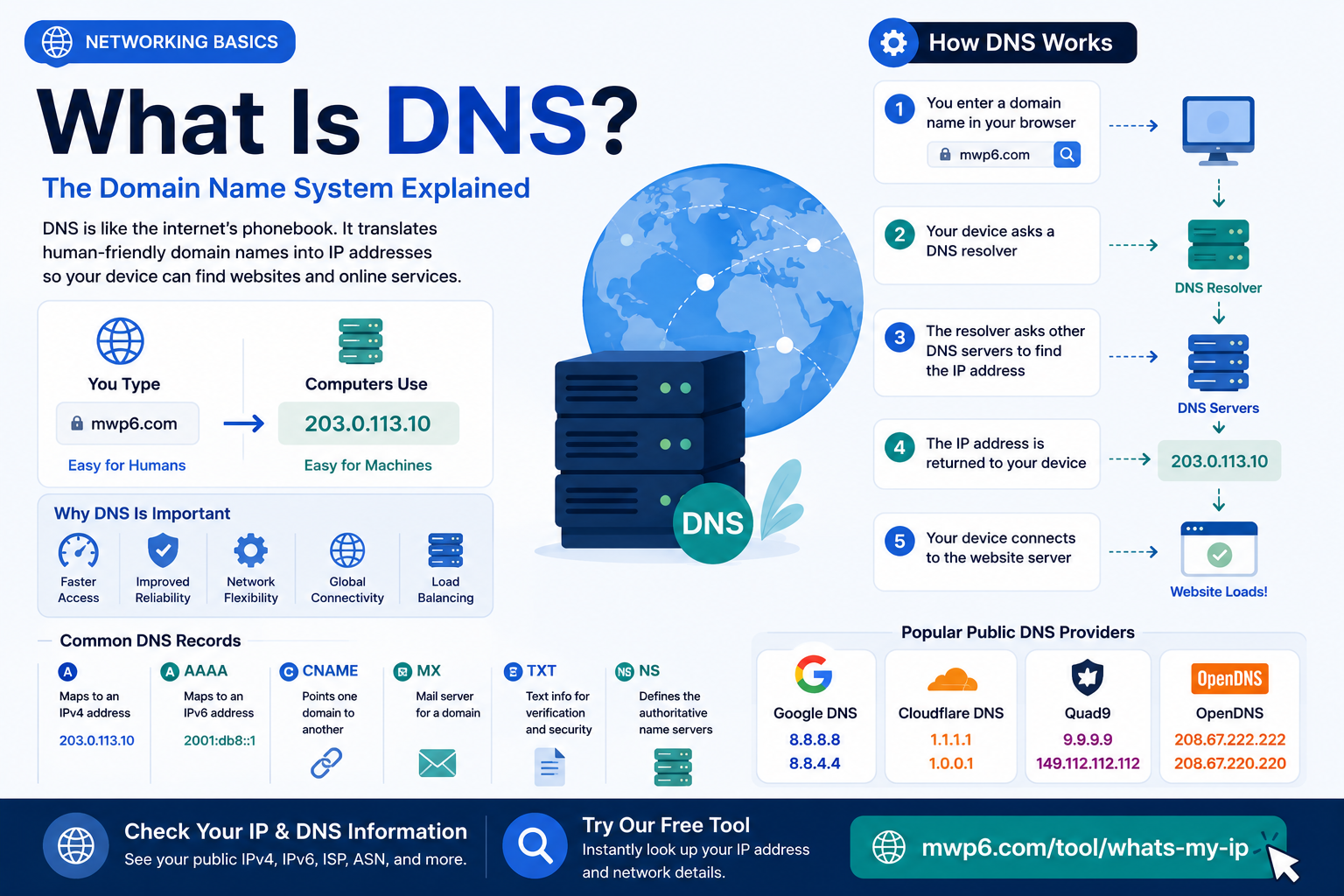
DNS stands for Domain Name System, and it's often described as the internet's phonebook. Instead of looking up phone numbers, DNS translates human-friendly domain names into IP addresses that computers use to communicate.
Although DNS operates in the background, it's one of the most important parts of the internet. It affects how quickly websites load, helps users reach the correct servers, and plays a role in internet security and reliability.
In this guide, you'll learn what DNS is, how it works, why it's important, and how to check the IP address behind any website.
What Is DNS?
DNS, or the Domain Name System, is a global system that translates domain names into IP addresses.
Humans prefer easy-to-read names like:
- google.com
- wikipedia.org
- mwp6.com
Computers, however, communicate using numerical IP addresses such as:
- 142.250.190.78
- 104.18.32.45
- 2606:4700::6812:202d
DNS connects these two worlds by finding the correct IP address whenever you enter a website name.
Without DNS, browsing the internet would be much more difficult because you'd need to remember the IP address of every website you wanted to visit.
Why Is DNS Important?
DNS makes the internet easier and more reliable to use.
Instead of remembering hundreds of IP addresses, you simply type a domain name into your browser.
DNS also allows website owners to change server IP addresses without requiring users to remember a new address.
Additional benefits include:
- Faster website access through DNS caching
- Better network flexibility
- Improved reliability
- Easier website management
- Load balancing across multiple servers
How Does DNS Work?
When you type a website address into your browser, several steps happen within milliseconds.
Step 1: You Enter a Domain Name
For example:
mwp6.com
Your browser first checks whether it already knows the IP address from a previous visit.
Step 2: DNS Cache Is Checked
If the address has been cached recently, the browser immediately uses the stored IP address.
If not, it asks a DNS resolver.
Step 3: The DNS Resolver Searches
The DNS resolver contacts other DNS servers to locate the correct IP address for the domain.
Step 4: The IP Address Is Returned
Once the IP address is found, it's sent back to your browser.
Step 5: The Website Loads
Your browser connects directly to the web server using the IP address, and the website appears on your screen.
The entire process usually takes only a fraction of a second.
DNS Records Explained
DNS stores different types of records, each serving a specific purpose.
A Record
Maps a domain name to an IPv4 address.
Example:
example.com → 203.0.113.10
AAAA Record
Maps a domain name to an IPv6 address.
Example:
example.com → 2001:db8::1
CNAME Record
Points one domain or subdomain to another domain.
Example:
blog.example.com → example.com
MX Record
Specifies which mail servers receive emails for a domain.
TXT Record
Stores text information used for verification and email security technologies like SPF, DKIM, and DMARC.
NS Record
Identifies the authoritative name servers responsible for a domain.
What Is a DNS Server?
A DNS server is a computer that answers DNS queries.
There are several types of DNS servers working together:
- Recursive Resolver
- Root Name Server
- Top-Level Domain (TLD) Server
- Authoritative Name Server
Each server has a different role, allowing the internet to locate websites quickly and efficiently.
Public DNS Providers
Many people use the DNS servers provided by their internet service provider.
Others prefer public DNS services for speed, reliability, or privacy.
Some popular public DNS providers include:
ProviderPrimary DNSGoogle Public DNS | 8.8.8.8
Cloudflare DNS | 1.1.1.1
Quad9 | 9.9.9.9
OpenDNS | 208.67.222.222
These services often offer faster response times and additional security features.
Can Changing DNS Make the Internet Faster?
Sometimes.
Changing your DNS server will not increase your internet bandwidth, but it may reduce the time needed to find website IP addresses.
A faster DNS server can result in:
- Quicker website lookups
- Faster initial page loading
- More reliable connections if your ISP's DNS is slow
The difference is usually noticeable when opening websites for the first time rather than during downloads or streaming.
DNS vs IP Address
Many people confuse DNS with IP addresses, but they serve different purposes.
DNSIP AddressHuman-readable | Machine-readable
Uses domain names | Uses numerical addresses
Translates names into IPs | Identifies devices and servers
Example: mwp6.com | Example: 203.0.113.10
DNS helps your browser discover the IP address needed to reach a website.
Common DNS Problems
If DNS stops working correctly, you may experience issues such as:
- Websites not loading
- "DNS Server Not Responding" errors
- Slow website access
- Intermittent connection problems
Many DNS issues can be resolved by:
- Restarting your router
- Flushing your DNS cache
- Switching to a different public DNS provider
- Checking your internet connection
How to Find the IP Address Behind a Website
Every website ultimately points to one or more IP addresses through DNS.
If you're curious about the network behind a website or want to verify your own public IP information, our free What Is My IP tool is a great place to start.
It instantly displays your:
- Public IPv4 address
- Public IPv6 address
- ISP
- Organization
- ASN
- Approximate IP location
Visit:
https://mwp6.com/tool/whats-my-ip
It's a simple way to better understand how DNS, IP addresses, and internet routing work together.
Frequently Asked Questions
What does DNS stand for?
DNS stands for Domain Name System, which translates domain names into IP addresses.
Is DNS the same as an IP address?
No. DNS translates domain names into IP addresses, while an IP address identifies a device or server on a network.
Can I change my DNS server?
Yes. Most operating systems and routers allow you to use custom DNS servers such as Google Public DNS or Cloudflare DNS.
Does changing DNS improve gaming?
It usually won't reduce in-game latency, but it may speed up the initial connection to online services.
What happens if DNS fails?
Your internet connection may still work, but you won't be able to access websites using their domain names until DNS is working again.
Which DNS server is the fastest?
The answer depends on your location. Cloudflare, Google Public DNS, and Quad9 are among the most popular choices worldwide.
How can I check my public IP address?
You can instantly view your public IPv4 and IPv6 addresses using our free What Is My IP tool.
Conclusion
DNS is one of the internet's most essential technologies, quietly translating domain names into IP addresses every time you visit a website. Without it, the web would be far less convenient, requiring users to remember numerical addresses instead of simple domain names.
Understanding how DNS works makes it easier to troubleshoot connection problems, choose a reliable DNS provider, and better understand how websites are located across the internet.
To see the public IP address that DNS ultimately connects you to, visit our free What Is My IP tool:
https://mwp6.com/tool/whats-my-ip
It instantly displays your public IPv4 and IPv6 addresses, ISP, organization, ASN, and other useful network details.
Contact
Missing something?
Feel free to request missing tools or give some feedback using our contact form.
Contact Us